
Key Takeaways
|
|
|
You've seen the ads. "Build a professional website in minutes!" "No coding required!" "AI does everything for you!" The promise of using AI website builders is tempting, especially when traditional web development quotes start at $3,000 and timelines stretch for months. ~50% of businesses now use AI-powered tools for content creation and website creation, and the AI website builder market is expected to hit $6.3 billion in 2026. With numbers like that, it's clear these tools aren't just hype. But after extensive hands-on testing with platforms like Lovable, Figma Make, and Figma Sites, we've learned what the marketing materials won't tell you about choosing the best AI website builder. Here's what actually happens when you try to build a real business AI website with an AI website generator. What AI Website Builders Actually Do WellLet's start with the good news, because there's plenty of it for those exploring an AI website builder. Speed is genuinely revolutionary. We built a complete website with full landing pages in under 30 minutes. What used to take weeks of back-and-forth with designers and developers now happens while you finish your coffee. For rapid prototyping or testing a business idea, this AI tool changes everything in the world of website building. The cost savings are real. Traditional web design costs range from $2,000 to $25,000+, while AI tools can build a site for less than $100 per month. For startups burning through runway or small businesses watching every dollar, that difference matters when choosing an AI website builder. The layouts look modern. AI has been trained on thousands of contemporary websites, so it understands current design patterns and AI website design principles. You'll get responsive layouts, mobile optimization, and visual hierarchies that follow 2026 standards. The bones of an AI website are usually solid. We found that tools like Lovable excel at generating initial concepts for a functional, well-structured website. Using similar prompts across different platforms, we achieved comparable starting points. The AI understood our requirements and produced clean, modern layouts without writing a single line of code, which helps explain why many teams turn to an AI website builder for early-stage exploration rather than final execution. Where Things Start to Break DownBut here's where the story gets complicated, and where our testing of various AI website builders revealed some hard truths. The Brand Precision ProblemEven the most advanced AI website builder struggles with the details that define your brand. Our testing of Lovable to Figma Make transitions showed that AI often can't "read" images well, requiring significant manual work to achieve a 1:1 match. In our testing, these brand issues showed up consistently:
UX research and industry evaluations have consistently shown that AI design tools tend to rely on standardized layout patterns and default styling decisions, rather than making context-aware brand judgments. As a result, companies using the same AI website builders often end up with structurally similar pages and familiar visual patterns. When your visual identity is part of your competitive advantage, this kind of sameness becomes a real problem for an AI-generated website. The Interaction GapThis was one of our biggest discoveries during testing: prototyping and interactive states don't carry over between design systems when using an AI website builder. When we moved designs from Lovable to Figma, hover states disappeared. While tools like Figma Make might assume and create their own hover states automatically, they won't reflect your specific interaction instances. The moment you want custom interactions or animations on your AI website, you're either stuck with what AI generates or you need to rebuild everything. You can set basic linking and hover states directly in tools like Figma Sites, but customization is limited. Complex scroll animations, state changes, and conditional logic require traditional website design expertise. The "AI Editing Trap"Here's something most vendors of AI website builders don't advertise: once you start editing AI-generated designs manually, you often break the AI's ability to help you further. In our testing with Figma Make, manual code edits meant the AI website builder couldn't re-update to reflect our changes. We were stuck either using AI for everything or doing everything manually. There was no hybrid approach. This creates a decision point: start with an AI website builder and you are committing to that workflow. Need to bring in a developer later? You might be rebuilding from scratch. The Platform Lock-In RealityWhen you generate an AI website with an AI website builder, you're entering that platform's ecosystem with all its constraints. During our Figma Sites testing, we discovered you cannot:
Migrating an AI website to a new platform is difficult and costly. Some platforms limit export options or block direct code access entirely, effectively locking their best AI features and web hosting into their proprietary environment. This is especially painful if you eventually need to scale to a complex online store. The Content Quality QuestionNeil Patel's research showed human-written content performs better 94.12% of the time. AI generated content hits different when you read it closely. The grammar is perfect, the structure is logical, but something's missing in the content generation process. In our testing, we found AI content often lacks brand voice consistency and the storytelling elements that build trust. Furthermore, if you rely on a built-in AI image generator, you may end up with generic visuals that don't reflect your actual product. You can prompt an AI website builder to adjust tone, but it's almost always a starting point that needs significant human editing. SEO: The Hidden GotchaAI-built websites can handle basic SEO, but many miss the deeper optimization needed to compete in established markets. Even when meta tags are included, AI and basic SEO tools often struggle with the details that make a site fully discoverable. Our testing revealed that artificial intelligence, basic SEO tools, and specialized AI SEO tools often struggle with:
An AI website builder can cover the basics, but to stand out and get found, careful human optimization is still required. When AI Makes Sense (And When It Doesn't)After testing workflows across multiple AI website builders, here's our practical decision framework. Use AI tools when:
Be cautious when:
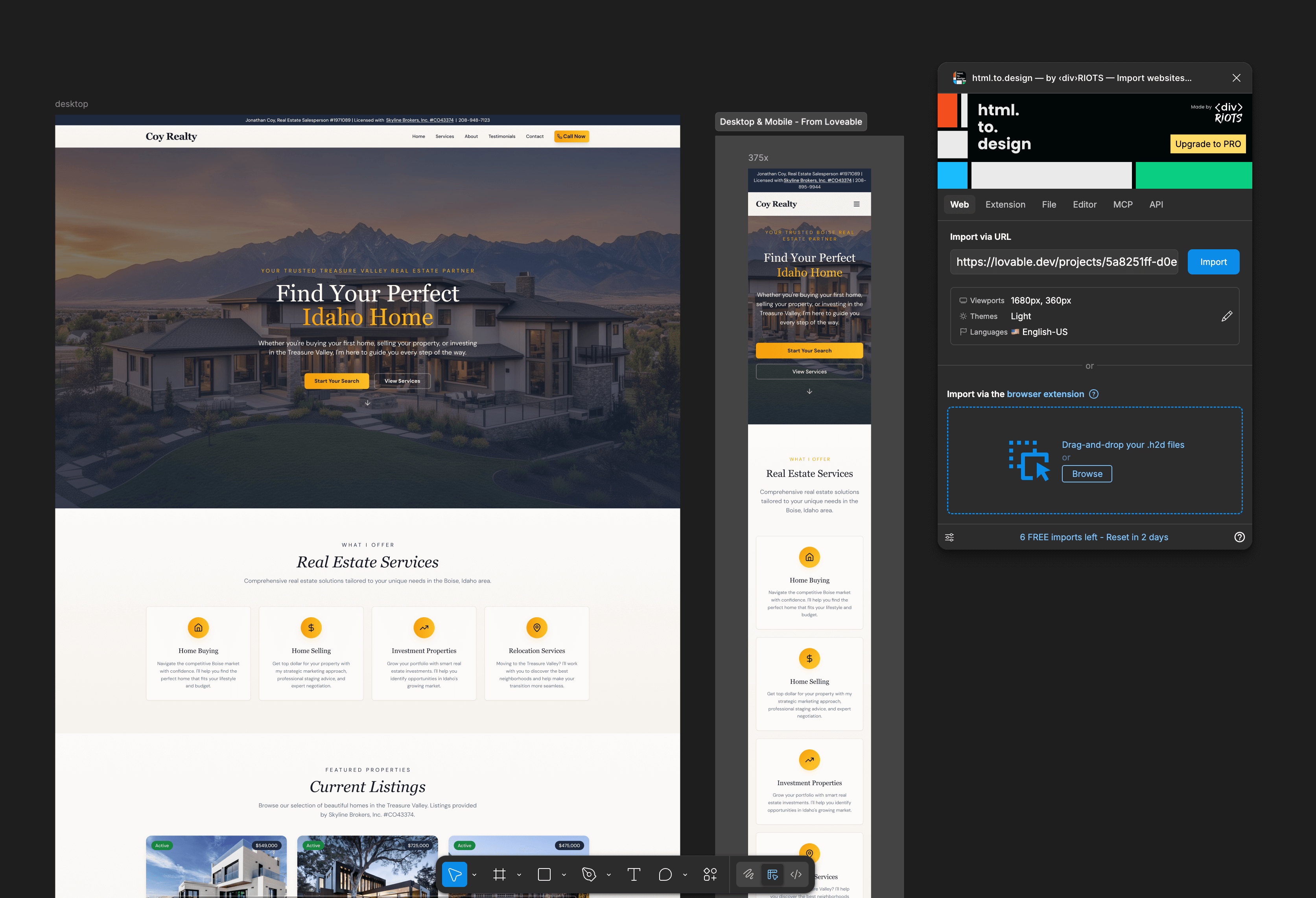
The Hybrid Approach That Actually WorksOur testing revealed that the most successful path isn't choosing an AI website builder or traditional development. It's knowing when to use each. Start with an AI website builder for rapid prototyping. We found that transferring a Lovable design to Figma using the html.design plugin works well for turning screenshots into editable components. Then, paste those frames into Figma Make for a 1:1 migration. But when you're ready to build the real thing, bring in experienced designers and developers. They'll take the best concepts from your AI website builder experiments and build something that:
More than 81% of developers report increased productivity when using AI tools in their workflows. The keyword is "workflows." AI as a tool in capable hands, not as a replacement for expertise. The Real Costs Nobody MentionsWhen evaluating an AI builder, most businesses focus on monthly subscription fees, but the total cost picture is more complex:
Our Testing ConclusionsAfter working through multiple AI website builder platforms, here's what we've learned: For simple sites, AI website builders are a legitimate option. For established businesses, they often create more problems than they solve. The best option we found was our own hybrid workflow: Start with Figma Make for rapid ideation. Then transfer the best concepts to standard Figma for manual refinement. Finally, hand off to developers who can build the exact technical foundation the business needs for its AI website. The Bottom LineThe truth about AI website builders is that they are genuinely useful for speed and exploration, but they are not magic. They can't capture your unique brand voice or build the complex interactions that drive conversions. With 78% of organizations now using AI in at least one business function, the question isn't whether an AI website builder has value. It clearly does. But for most serious businesses, the answer remains: AI is helpful, but you still need a designer and developer to finish strong and shape that foundation into a stunning website built with intention. The tools will keep improving, but technology is a tool, not a solution. The businesses that succeed with AI website builders are the ones who understand that distinction. |

FAQ
What is the best AI website builder in 2026?
The best AI website builder depends on what you actually need from the platform. Some AI website builders focus on rapid prototyping and speed, while others prioritize design flexibility or developer workflows. In our testing, tools like Lovable, Figma Make, and Figma Sites performed well for early-stage ideation, but each came with limitations around customization, scalability, and long-term flexibility.
For simple websites or early-stage projects, an AI website builder can dramatically reduce development time. For established brands with strict design standards, complex functionality, or advanced integrations, traditional design and development workflows still provide more control.
What makes an effective AI website builder?
An effective AI website builder should do more than generate attractive layouts. It should support responsive design, maintain brand consistency, allow scalable customization, and produce editable outputs that developers and marketers can actually work with long-term.
The strongest AI website builders also balance automation with flexibility. Features like editable components, structured layouts, CMS compatibility, and strong export functionality matter far more than flashy AI demos alone.
What are the main features of AI website builders?
Most AI website builders now include:
- AI-generated layouts
- Responsive design generation
- Basic SEO tools
- AI-assisted content generation
- Drag-and-drop editing
- AI image generation
- Website hosting
- Mobile optimization
- Theme customization
- Basic ecommerce functionality
Some platforms also include integrations with analytics tools, CMS systems, and marketing platforms. However, feature depth varies significantly between platforms.
How do AI website builders work?
AI website builders typically use large training datasets made up of existing website structures, design systems, UI patterns, and frontend code examples. When users enter prompts, the platform interprets those instructions and generates layouts, styling, content structure, and components based on learned design patterns.
Most AI website builders rely on combinations of machine learning, pattern recognition, natural language processing, and predefined component systems to generate websites quickly. The result is usually a functional starting point rather than a fully customized production-ready website.
Do AI website builders actually write code?
Yes, most AI website builders generate underlying frontend code automatically. Depending on the platform, this may include HTML, CSS, JavaScript, React components, or proprietary layout systems. Some platforms allow direct access to generated code, while others keep users inside closed ecosystems with limited editing flexibility.
This becomes important when businesses eventually need developer support, advanced integrations, or custom functionality that extends beyond what the AI builder originally generated.
Why do AI-generated websites often look similar?
Most AI website builders are trained on similar modern web design patterns, which means they often produce layouts with similar structure, spacing, navigation styles, and visual hierarchy. While the designs may look polished, they can lack the distinctiveness needed for strong brand differentiation.
This is one reason why businesses with established branding often move from AI-generated concepts into manual refinement and custom development workflows.
What are the limitations of AI website builders?
AI website builders still struggle with:
- Advanced custom interactions
- Complex animations
- Brand precision
- Scalable backend functionality
- Long-term maintainability
- Deep SEO strategy
- Complex ecommerce experiences
- Advanced accessibility requirements
- Sophisticated CMS workflows
Manual edits can also break AI synchronization on some platforms, limiting future automation and creating additional development overhead.
Are AI website builders good for ecommerce websites?
AI website builders can work well for smaller ecommerce launches, prototype storefronts, or temporary campaign pages. However, larger ecommerce businesses often outgrow them quickly due to limitations around customization, integrations, inventory systems, and advanced customer experiences.
For brands with complex online stores, custom development still offers significantly more flexibility, performance control, and scalability.
What is AI web design?
AI web design refers to the use of artificial intelligence tools to generate layouts, structure content, assist with design decisions, and automate parts of the website creation process. Rather than manually designing every element from scratch, designers and businesses can use AI to accelerate ideation, prototyping, and layout generation.
In practice, AI web design works best as a collaborative workflow where human designers refine and improve AI-generated concepts rather than relying entirely on automation.