ABOUT

PORTFOLIO

CONTACT

The Truth About AI Website Builders in 2026 Blog https://content.arcticleaf.com/api/files/articles/75q42xqp7ble7x7/blog_thumbnail_3_eoe4ns43n1.webp 10 learning Learning AI,E-Commerce

Key Takeaways 

  1. AI website builders excel at rapid prototyping but often fail to meet specific brand guidelines.

  2. Custom interactions and complex animations still require traditional development to function properly.

  3. Manual edits to AI code frequently break the platform's ability to provide future updates.

  4. Most AI generated sites share a similar structural logic that can hurt your brand identity.

  5. Expert designers and developers remain necessary to create high performance business websites.

You've seen the ads. "Build a professional website in minutes!" "No coding required!" "AI does everything for you!" The promise of using AI website builders is tempting, especially when traditional web development quotes start at $3,000 and timelines stretch for months.

~50% of businesses now use AI-powered tools for content creation and website creation, and the AI website builder market is expected to hit $6.3 billion in 2026. With numbers like that, it's clear these tools aren't just hype. But after extensive hands-on testing with platforms like Lovable, Figma Make, and Figma Sites, we've learned what the marketing materials won't tell you about choosing the best AI website builder. Here's what actually happens when you try to build a real business AI website with an AI website generator.

What AI Website Builders Actually Do Well

Let's start with the good news, because there's plenty of it for those exploring an AI website builder.

Speed is genuinely revolutionary. We built a complete website with full landing pages in under 30 minutes. What used to take weeks of back-and-forth with designers and developers now happens while you finish your coffee. For rapid prototyping or testing a business idea, this AI tool changes everything in the world of website building.

The cost savings are real. Traditional web design costs range from $2,000 to $25,000+, while AI tools can build a site for less than $100 per month. For startups burning through runway or small businesses watching every dollar, that difference matters when choosing an AI website builder.

The layouts look modern. AI has been trained on thousands of contemporary websites, so it understands current design patterns and AI website design principles. You'll get responsive layouts, mobile optimization, and visual hierarchies that follow 2026 standards. The bones of an AI website are usually solid.

We found that tools like Lovable excel at generating initial concepts for a functional, well-structured website. Using similar prompts across different platforms, we achieved comparable starting points. The AI understood our requirements and produced clean, modern layouts without writing a single line of code, which helps explain why many teams turn to an AI website builder for early-stage exploration rather than final execution.

Where Things Start to Break Down

But here's where the story gets complicated, and where our testing of various AI website builders revealed some hard truths.

The Brand Precision Problem

Even the most advanced AI website builder struggles with the details that define your brand. Our testing of Lovable to Figma Make transitions showed that AI often can't "read" images well, requiring significant manual work to achieve a 1:1 match. In our testing, these brand issues showed up consistently:

  • Font weight adjustments: Difficult for AI to get right accurately, even with specific prompts.

  • Iconography: Rarely transfers 1:1 accurately between platforms.

  • Component sizing: Required manual intervention to fix missing elements and overlapping text.

  • Styling accuracy: Often defaults to generic choices that don't match brand personality.

UX research and industry evaluations have consistently shown that AI design tools tend to rely on standardized layout patterns and default styling decisions, rather than making context-aware brand judgments. As a result, companies using the same AI website builders often end up with structurally similar pages and familiar visual patterns. When your visual identity is part of your competitive advantage, this kind of sameness becomes a real problem for an AI-generated website.

The Interaction Gap

This was one of our biggest discoveries during testing: prototyping and interactive states don't carry over between design systems when using an AI website builder.

When we moved designs from Lovable to Figma, hover states disappeared. While tools like Figma Make might assume and create their own hover states automatically, they won't reflect your specific interaction instances. The moment you want custom interactions or animations on your AI website, you're either stuck with what AI generates or you need to rebuild everything.

You can set basic linking and hover states directly in tools like Figma Sites, but customization is limited. Complex scroll animations, state changes, and conditional logic require traditional website design expertise.

The "AI Editing Trap"

Here's something most vendors of AI website builders don't advertise: once you start editing AI-generated designs manually, you often break the AI's ability to help you further.

In our testing with Figma Make, manual code edits meant the AI website builder couldn't re-update to reflect our changes. We were stuck either using AI for everything or doing everything manually. There was no hybrid approach. This creates a decision point: start with an AI website builder and you are committing to that workflow. Need to bring in a developer later? You might be rebuilding from scratch.

The Platform Lock-In Reality

When you generate an AI website with an AI website builder, you're entering that platform's ecosystem with all its constraints. During our Figma Sites testing, we discovered you cannot:

  • Upload a screenshot or image to automatically convert it into editable text or auto-layout sections.

  • Retain prototype links, interactive components, overlays, or smart animate transitions.

  • Use "if this then that" logic or variables and states.

  • Easily integrate third-party tracking like Google Analytics without code access.

Migrating an AI website to a new platform is difficult and costly. Some platforms limit export options or block direct code access entirely, effectively locking their best AI features and web hosting into their proprietary environment. This is especially painful if you eventually need to scale to a complex online store.

The Content Quality Question

Neil Patel's research showed human-written content performs better 94.12% of the time. AI generated content hits different when you read it closely. The grammar is perfect, the structure is logical, but something's missing in the content generation process.

In our testing, we found AI content often lacks brand voice consistency and the storytelling elements that build trust. Furthermore, if you rely on a built-in AI image generator, you may end up with generic visuals that don't reflect your actual product. You can prompt an AI website builder to adjust tone, but it's almost always a starting point that needs significant human editing.

SEO: The Hidden Gotcha

AI-built websites can handle basic SEO, but many miss the deeper optimization needed to compete in established markets. Even when meta tags are included, AI and basic SEO tools often struggle with the details that make a site fully discoverable.

Our testing revealed that artificial intelligence, basic SEO tools, and specialized AI SEO tools often struggle with:

  • Competitor research and content planning

  • Semantic structuring for featured snippets

  • Strategic keyword placement that feels natural

  • Schema markup for rich results

An AI website builder can cover the basics, but to stand out and get found, careful human optimization is still required.

When AI Makes Sense (And When It Doesn't)

After testing workflows across multiple AI website builders, here's our practical decision framework.

Use AI tools when:

  • You need faster concepting. Nothing beats an AI website builder for rapid iteration on layout directions. We created multiple versions in the time it would take to brief a designer on one.

  • You're building a simple marketing site quickly. For single-page sites or basic portfolios where the AI website serves a straightforward purpose.

  • You want rapid iteration on layout directions. Testing different approaches to content hierarchy is simple with AI website generation.

Be cautious when:

  • The business is established and needs consistency. AI often creates more work than it saves when you have existing brand guidelines.

  • Brand precision matters. Industries like finance or healthcare need pixel-perfect implementation for their AI website.

  • Interactions are complex. Multi-step forms or user dashboards push beyond what most AI website builders handle.

  • Content updates must be easy for a non-technical team long-term. Traditional CMS platforms often provide better tools for daily updates than an AI website builder.

The Hybrid Approach That Actually Works

Our testing revealed that the most successful path isn't choosing an AI website builder or traditional development. It's knowing when to use each.

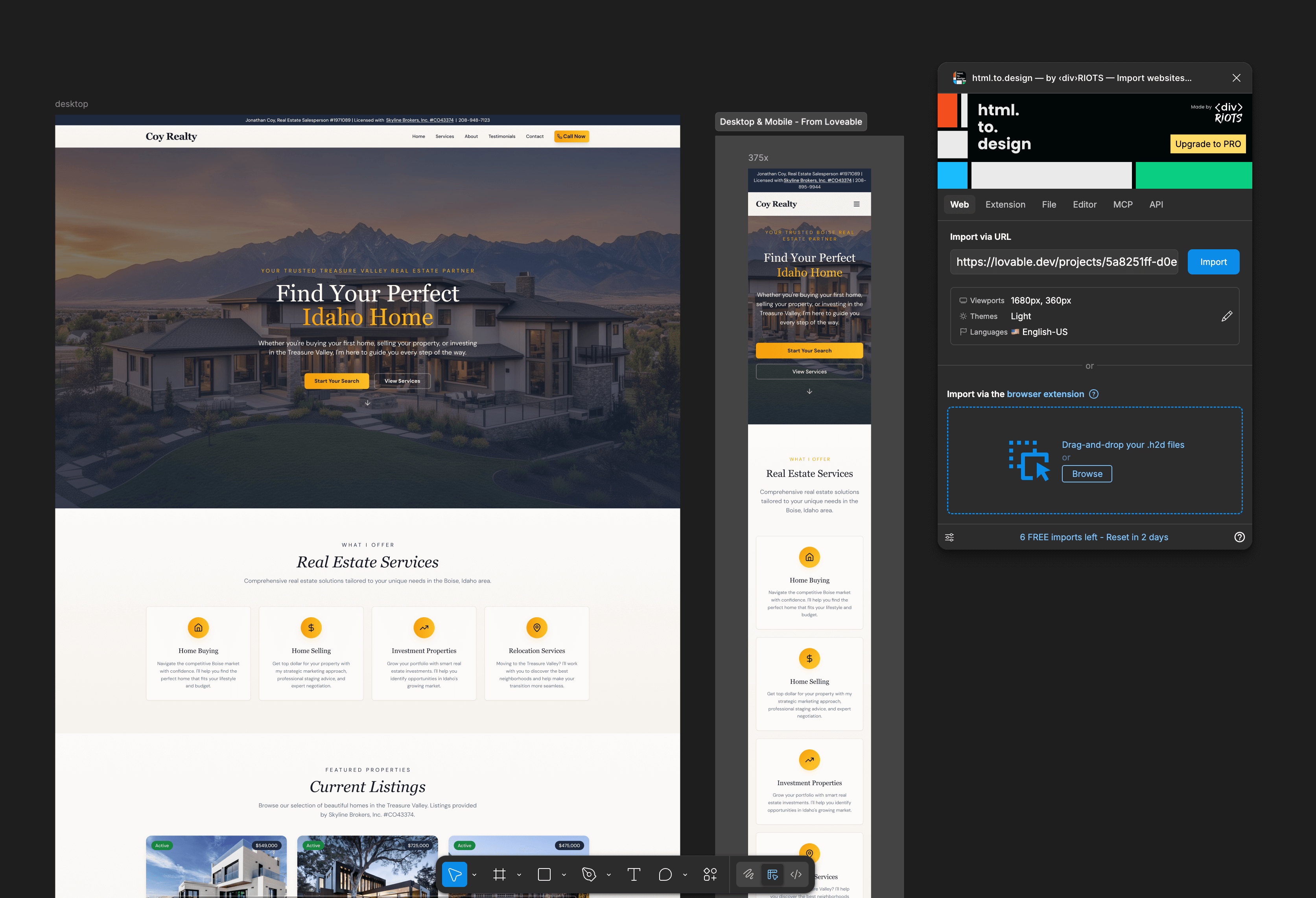
Start with an AI website builder for rapid prototyping. We found that transferring a Lovable design to Figma using the html.design plugin works well for turning screenshots into editable components. Then, paste those frames into Figma Make for a 1:1 migration.

But when you're ready to build the real thing, bring in experienced designers and developers. They'll take the best concepts from your AI website builder experiments and build something that:

  • Matches your brand precisely without "broken" AI sync issues.

  • Includes complex interactions that AI can't currently automate.

  • Scales as your business grows without platform lock-in.

More than 81% of developers report increased productivity when using AI tools in their workflows. The keyword is "workflows." AI as a tool in capable hands, not as a replacement for expertise.

The Real Costs Nobody Mentions

When evaluating an AI builder, most businesses focus on monthly subscription fees, but the total cost picture is more complex:

  • Time cost of learning limitations. You'll spend hours discovering what the AI website builder can't do—like the fact that Figma Sites doesn't allow "make this button do X" or any API calls.

  • Redesign costs. 70% of clients close after a prototype demonstration of an AI website builder solution, but prototypes aren't production systems.

  • Opportunity cost. An AI website that looks like everyone else's or lacks intuitive interactions costs you conversions every day.

  • Team frustration. When a marketing team can't make simple updates because manual edits broke the AI sync, productivity suffers.

Our Testing Conclusions

After working through multiple AI website builder platforms, here's what we've learned:

For simple sites, AI website builders are a legitimate option. For established businesses, they often create more problems than they solve. The best option we found was our own hybrid workflow: Start with Figma Make for rapid ideation. Then transfer the best concepts to standard Figma for manual refinement. Finally, hand off to developers who can build the exact technical foundation the business needs for its AI website.

The Bottom Line

The truth about AI website builders is that they are genuinely useful for speed and exploration, but they are not magic. They can't capture your unique brand voice or build the complex interactions that drive conversions.

With 78% of organizations now using AI in at least one business function, the question isn't whether an AI website builder has value. It clearly does. But for most serious businesses, the answer remains: AI is helpful, but you still need a designer and developer to finish strong and shape that foundation into a stunning website built with intention.

The tools will keep improving, but technology is a tool, not a solution. The businesses that succeed with AI website builders are the ones who understand that distinction.


  • Author: Arctic Leaf Team
  • Feb 18 2026
  • Estimated 10 min read

The Truth About AI Website Builders in 2026

Key Takeaways 

  1. AI website builders excel at rapid prototyping but often fail to meet specific brand guidelines.

  2. Custom interactions and complex animations still require traditional development to function properly.

  3. Manual edits to AI code frequently break the platform's ability to provide future updates.

  4. Most AI generated sites share a similar structural logic that can hurt your brand identity.

  5. Expert designers and developers remain necessary to create high performance business websites.

You've seen the ads. "Build a professional website in minutes!" "No coding required!" "AI does everything for you!" The promise of using AI website builders is tempting, especially when traditional web development quotes start at $3,000 and timelines stretch for months.

~50% of businesses now use AI-powered tools for content creation and website creation, and the AI website builder market is expected to hit $6.3 billion in 2026. With numbers like that, it's clear these tools aren't just hype. But after extensive hands-on testing with platforms like Lovable, Figma Make, and Figma Sites, we've learned what the marketing materials won't tell you about choosing the best AI website builder. Here's what actually happens when you try to build a real business AI website with an AI website generator.

What AI Website Builders Actually Do Well

Let's start with the good news, because there's plenty of it for those exploring an AI website builder.

Speed is genuinely revolutionary. We built a complete website with full landing pages in under 30 minutes. What used to take weeks of back-and-forth with designers and developers now happens while you finish your coffee. For rapid prototyping or testing a business idea, this AI tool changes everything in the world of website building.

The cost savings are real. Traditional web design costs range from $2,000 to $25,000+, while AI tools can build a site for less than $100 per month. For startups burning through runway or small businesses watching every dollar, that difference matters when choosing an AI website builder.

The layouts look modern. AI has been trained on thousands of contemporary websites, so it understands current design patterns and AI website design principles. You'll get responsive layouts, mobile optimization, and visual hierarchies that follow 2026 standards. The bones of an AI website are usually solid.

We found that tools like Lovable excel at generating initial concepts for a functional, well-structured website. Using similar prompts across different platforms, we achieved comparable starting points. The AI understood our requirements and produced clean, modern layouts without writing a single line of code, which helps explain why many teams turn to an AI website builder for early-stage exploration rather than final execution.

Where Things Start to Break Down

But here's where the story gets complicated, and where our testing of various AI website builders revealed some hard truths.

The Brand Precision Problem

Even the most advanced AI website builder struggles with the details that define your brand. Our testing of Lovable to Figma Make transitions showed that AI often can't "read" images well, requiring significant manual work to achieve a 1:1 match. In our testing, these brand issues showed up consistently:

  • Font weight adjustments: Difficult for AI to get right accurately, even with specific prompts.

  • Iconography: Rarely transfers 1:1 accurately between platforms.

  • Component sizing: Required manual intervention to fix missing elements and overlapping text.

  • Styling accuracy: Often defaults to generic choices that don't match brand personality.

UX research and industry evaluations have consistently shown that AI design tools tend to rely on standardized layout patterns and default styling decisions, rather than making context-aware brand judgments. As a result, companies using the same AI website builders often end up with structurally similar pages and familiar visual patterns. When your visual identity is part of your competitive advantage, this kind of sameness becomes a real problem for an AI-generated website.

The Interaction Gap

This was one of our biggest discoveries during testing: prototyping and interactive states don't carry over between design systems when using an AI website builder.

When we moved designs from Lovable to Figma, hover states disappeared. While tools like Figma Make might assume and create their own hover states automatically, they won't reflect your specific interaction instances. The moment you want custom interactions or animations on your AI website, you're either stuck with what AI generates or you need to rebuild everything.

You can set basic linking and hover states directly in tools like Figma Sites, but customization is limited. Complex scroll animations, state changes, and conditional logic require traditional website design expertise.

The "AI Editing Trap"

Here's something most vendors of AI website builders don't advertise: once you start editing AI-generated designs manually, you often break the AI's ability to help you further.

In our testing with Figma Make, manual code edits meant the AI website builder couldn't re-update to reflect our changes. We were stuck either using AI for everything or doing everything manually. There was no hybrid approach. This creates a decision point: start with an AI website builder and you are committing to that workflow. Need to bring in a developer later? You might be rebuilding from scratch.

The Platform Lock-In Reality

When you generate an AI website with an AI website builder, you're entering that platform's ecosystem with all its constraints. During our Figma Sites testing, we discovered you cannot:

  • Upload a screenshot or image to automatically convert it into editable text or auto-layout sections.

  • Retain prototype links, interactive components, overlays, or smart animate transitions.

  • Use "if this then that" logic or variables and states.

  • Easily integrate third-party tracking like Google Analytics without code access.

Migrating an AI website to a new platform is difficult and costly. Some platforms limit export options or block direct code access entirely, effectively locking their best AI features and web hosting into their proprietary environment. This is especially painful if you eventually need to scale to a complex online store.

The Content Quality Question

Neil Patel's research showed human-written content performs better 94.12% of the time. AI generated content hits different when you read it closely. The grammar is perfect, the structure is logical, but something's missing in the content generation process.

In our testing, we found AI content often lacks brand voice consistency and the storytelling elements that build trust. Furthermore, if you rely on a built-in AI image generator, you may end up with generic visuals that don't reflect your actual product. You can prompt an AI website builder to adjust tone, but it's almost always a starting point that needs significant human editing.

SEO: The Hidden Gotcha

AI-built websites can handle basic SEO, but many miss the deeper optimization needed to compete in established markets. Even when meta tags are included, AI and basic SEO tools often struggle with the details that make a site fully discoverable.

Our testing revealed that artificial intelligence, basic SEO tools, and specialized AI SEO tools often struggle with:

  • Competitor research and content planning

  • Semantic structuring for featured snippets

  • Strategic keyword placement that feels natural

  • Schema markup for rich results

An AI website builder can cover the basics, but to stand out and get found, careful human optimization is still required.

When AI Makes Sense (And When It Doesn't)

After testing workflows across multiple AI website builders, here's our practical decision framework.

Use AI tools when:

  • You need faster concepting. Nothing beats an AI website builder for rapid iteration on layout directions. We created multiple versions in the time it would take to brief a designer on one.

  • You're building a simple marketing site quickly. For single-page sites or basic portfolios where the AI website serves a straightforward purpose.

  • You want rapid iteration on layout directions. Testing different approaches to content hierarchy is simple with AI website generation.

Be cautious when:

  • The business is established and needs consistency. AI often creates more work than it saves when you have existing brand guidelines.

  • Brand precision matters. Industries like finance or healthcare need pixel-perfect implementation for their AI website.

  • Interactions are complex. Multi-step forms or user dashboards push beyond what most AI website builders handle.

  • Content updates must be easy for a non-technical team long-term. Traditional CMS platforms often provide better tools for daily updates than an AI website builder.

The Hybrid Approach That Actually Works

Our testing revealed that the most successful path isn't choosing an AI website builder or traditional development. It's knowing when to use each.

Start with an AI website builder for rapid prototyping. We found that transferring a Lovable design to Figma using the html.design plugin works well for turning screenshots into editable components. Then, paste those frames into Figma Make for a 1:1 migration.

But when you're ready to build the real thing, bring in experienced designers and developers. They'll take the best concepts from your AI website builder experiments and build something that:

  • Matches your brand precisely without "broken" AI sync issues.

  • Includes complex interactions that AI can't currently automate.

  • Scales as your business grows without platform lock-in.

More than 81% of developers report increased productivity when using AI tools in their workflows. The keyword is "workflows." AI as a tool in capable hands, not as a replacement for expertise.

The Real Costs Nobody Mentions

When evaluating an AI builder, most businesses focus on monthly subscription fees, but the total cost picture is more complex:

  • Time cost of learning limitations. You'll spend hours discovering what the AI website builder can't do—like the fact that Figma Sites doesn't allow "make this button do X" or any API calls.

  • Redesign costs. 70% of clients close after a prototype demonstration of an AI website builder solution, but prototypes aren't production systems.

  • Opportunity cost. An AI website that looks like everyone else's or lacks intuitive interactions costs you conversions every day.

  • Team frustration. When a marketing team can't make simple updates because manual edits broke the AI sync, productivity suffers.

Our Testing Conclusions

After working through multiple AI website builder platforms, here's what we've learned:

For simple sites, AI website builders are a legitimate option. For established businesses, they often create more problems than they solve. The best option we found was our own hybrid workflow: Start with Figma Make for rapid ideation. Then transfer the best concepts to standard Figma for manual refinement. Finally, hand off to developers who can build the exact technical foundation the business needs for its AI website.

The Bottom Line

The truth about AI website builders is that they are genuinely useful for speed and exploration, but they are not magic. They can't capture your unique brand voice or build the complex interactions that drive conversions.

With 78% of organizations now using AI in at least one business function, the question isn't whether an AI website builder has value. It clearly does. But for most serious businesses, the answer remains: AI is helpful, but you still need a designer and developer to finish strong and shape that foundation into a stunning website built with intention.

The tools will keep improving, but technology is a tool, not a solution. The businesses that succeed with AI website builders are the ones who understand that distinction.


  • AI
  • E-Commerce