Key Takeaways
- GPT 4.0 excels in photorealistic images and product mockups.
- Midjourney is best for artistic, conceptual, and stylized visuals.
- GPT 4.0 allows editing, while Midjourney offers little control.
- Text rendering in AI images remains a challenge for both tools.
- GPT 4.0 is better for business use; Midjourney shines in design.
AI-driven image generation is evolving fast, with two major players leading the way: GPT-4’s image generator and Midjourney. While both offer impressive capabilities, they cater to different needs. Let’s break down how each platform compares and which one is better suited for your projects.
For brands comparing GPT 4.0 vs Midjourney, the real question usually comes down to workflow, realism, and how much control you need over the final output.
GPT-4 Image Generator: Features & Strengths
GPT-4 has gone beyond text and now includes an integrated ChatGPT image generator capable of creating high-quality, photorealistic visuals. A standout feature is its ability to analyze and edit images, making it an attractive option for businesses and creators looking for versatility.
ChatGPT 4o has also improved how users interact with image generation by allowing more conversational refinement throughout the creative process. Instead of rewriting every prompt from scratch, users can continue iterating naturally within the chat.
-
Realism: Strong photorealistic results, particularly in product photography.
-
Editing Capabilities: Users can tweak and refine generated images.
-
Text Rendering: Still has some issues with text accuracy, but improving.
-
Integration: Works within ChatGPT, making it easy to use alongside text-based tasks.
This makes GPT-4 a solid choice for brands that need realistic, customizable visuals without extra hassle.
One major advantage of ChatGPT 4o is how well it handles reasoning during image generation. Users can refine a prompt conversationally and receive more context-aware outputs compared to many standalone platforms.
For ecommerce and branding teams, this creates a stronger use case for rapid concepting, mockups, campaign ideation, and product visualization.
Midjourney: Features & Strengths
Midjourney is known for its artistic approach, producing highly stylized and creative images. The Midjourney prompt model allows users to generate complex visuals, making it popular among digital artists and designers.
-
Artistic Flair: Best for conceptual and stylized artwork.
-
Midjourney v6 prompts: Offers more control over image output but remains less precise in photorealistic rendering.
-
Text Handling: Historically struggled with rendering text, but v6 has improved this.
-
Standalone Platform: Operates separately from ChatGPT and requires external access.
Midjourney is a strong option for those prioritizing creativity over strict realism.
Compared directly in GPT 4.0 vs Midjourney testing, Midjourney still tends to produce more visually dramatic outputs, especially when working with abstract concepts or cinematic art styles.
Prompt structure also plays a major role in Midjourney results. A detailed prompt with lighting direction, camera framing, material references, and styling cues often produces noticeably stronger outputs.
Side-by-Side Feature Comparison
|
Feature |
GPT-4 Image Generator |
Midjourney |
|
Image Realism |
High |
Moderate |
|
Editing Capabilities |
Yes |
No |
|
Text Rendering |
Somewhat accurate |
Improved but still limited |
|
Ease of Use |
Integrated with ChatGPT |
Requires external access |
|
Creative Freedom |
Moderate |
High |
|
Best Use Cases |
Product mockups, realistic portraits |
Concept art, illustrations |
The same prompt can also generate dramatically different results across platforms, which makes prompt writing an increasingly valuable skill for creative teams using AI.
Testing an identical prompt across both systems is often the fastest way to understand how differently GPT-4 and Midjourney interpret style, composition, and realism.
Expert Insight: How Our Team Uses GPT-4 vs. Midjourney
Natalie Pucacco, Creative Director at Arctic Leaf, shares our hands-on experience with both platforms.
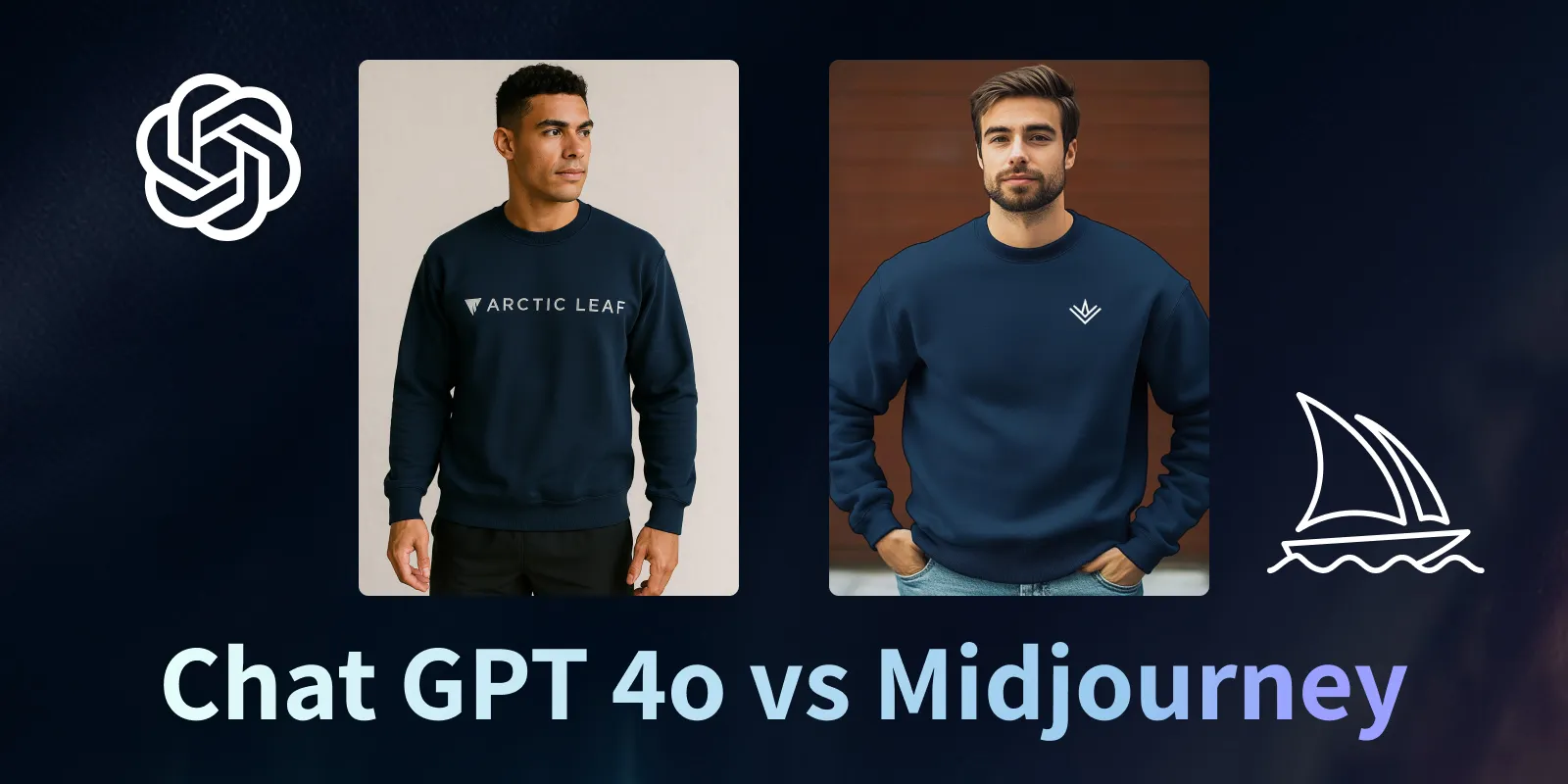
“We recently tested ChatGPT’s image generator versus Midjourney for a real-world design challenge. The goal was to create an image of a model wearing a branded t-shirt in an urban setting. Here’s what we found:
-
GPT-4 gave us a highly realistic model and background, closely matching the brand's aesthetic. The only issue? Some minor text distortion on the sleeve, which was easy to fix.
-
Midjourney, on the other hand, failed to capture product accuracy. The face looked overly AI-generated, and the t-shirt did not match our brand’s original design.
For businesses with limited high-quality photography, generative AI is becoming a viable alternative—if the result is realistic enough. Retouching an image in Photoshop is one thing, but fully generating a model wearing a product requires a high degree of accuracy. Right now, GPT-4 is leading in this area, making it the better choice for product visuals.”
This kind of side-by-side testing highlights how important prompt quality has become when evaluating modern AI image workflows.
Image quality can vary dramatically depending on the wording, specificity, and structure of each prompt, especially when generating branded visuals or realistic human subjects.
The Verdict: Which One Should You Use?
-
Use GPT-4 if: You need realistic images, product mockups, or minor edits.
-
Use Midjourney if: You want artistic, stylized, or conceptual visuals.
ChatGPT 4o currently feels better suited for brands that need flexibility, iteration, and conversational refinement while building visual assets.
Midjourney still performs exceptionally well for artists and designers prioritizing mood, atmosphere, and highly stylized composition.
Stable diffusion also remains part of the conversation for teams wanting open-source flexibility and deeper customization, although it typically requires more technical setup than either GPT-4 or Midjourney.
Ultimately, the best AI tool depends on your workflow, visual goals, technical comfort level, and how much control you want over each prompt and revision cycle.
For many business applications, GPT-4 currently provides the smoother experience. For highly artistic exploration, Midjourney still has an edge.
Working With Arctic Leaf
At Arctic Leaf, we specialize in digital marketing, design, and AI-driven solutions. Whether you’re looking to integrate ChatGPT’s image generator into your creative process or experiment with Midjourney prompts, we help businesses get the most out of AI tools.
Teams using ChatGPT Plus also gain access to additional GPT-4 image capabilities, making the platform increasingly useful for production-ready creative workflows.
Reach out to our team to explore what’s possible for your brand.
AI Image Generation FAQ
1. Can ChatGPT generate images?
Yes. GPT-4.0 includes an AI image generator that creates high-quality, photorealistic visuals. It’s built into ChatGPT, so you don’t need extra software.
2. Can ChatGPT analyze images?
Yes. GPT-4.0 can look at images, understand details, and provide insights. Whether it’s product design or creative adjustments, it helps refine your visuals.
3. ChatGPT that can read images—what does that mean?
It means GPT-4.0 can process and interpret images, not just generate them. You can upload an image, and ChatGPT will describe, analyze, or suggest edits.
4. Can ChatGPT edit photos?
Yes, but within limits. It can adjust details in generated images, refine visuals, and improve accuracy. For deep edits, external tools like Photoshop are still needed.
Prompt refinement also plays a major role here. A stronger prompt usually leads to stronger outputs and fewer editing revisions later.
5. How can I show ChatGPT an image?
For anyone wondering how to show ChatGPT an image, it’s easy. Simply upload the image in the chat window. GPT-4.0 will analyze it, answer questions, or suggest changes based on what you need.
Many teams now test multiple prompt variations before finalizing creative direction, especially for branded campaigns and ecommerce visuals.